PowerEPOS Remote Order System Overview
The Remote Order System (ROS) is an API for allowing third parties to send orders to a PowerEPOS outlet (POS) to support one of four different workflows:
- Courier Pickup
- Where the third party is responsible for physically picking up delivering an order from the POS
- Consumer Pickup
- Where the consumer themselves are picking up the order
- Store Delivery
- Where outlet is responsible for delivering the order to the consumer
- Eat In
- Where the consumer is physically located within the restaurant and is placing an order to be delivered to them
Vocabulary
Before proceeding it will be good to familiarise yourself with the vocabulary used by this API
- Remote Order - A simplified order/transaction being supplied by a third party that needs to be transmitted to a POS for conversion into a proper PowerEPOS SalesTransaction complete with taxes, tags and other details.
- Outlet - The restaurant receiving the order
- Provider - The third party taking the order on behalf of a consumer (eg Uber Eats, Deliveroo, Glovo, etc)
- Consumer - The person making the order through the provider
- Courier - The person collecting the order on behalf of provider for delivery to Consumer. Not employed by outlet.
- Cancel - A cancellation occurs when the provider/consumer decide to cancel on an already sent remote order
- Reject - A remote order rejection occurs when the Outlet decide to cancel a remote order (eg out of stock)
- Confirm - A remote order confirmation occurs when the Outlet tells POSCore that it WILL prepare the order
- Processed - A remote order is considered processed when it has been either confirmed or rejected.
Getting Started
Please see our onboarding documentation for getting setup with third party provider credentials.
Architecture Overview
The ROS service will act as a RESTful API into the PowerEPOS ecosystem for a provider.
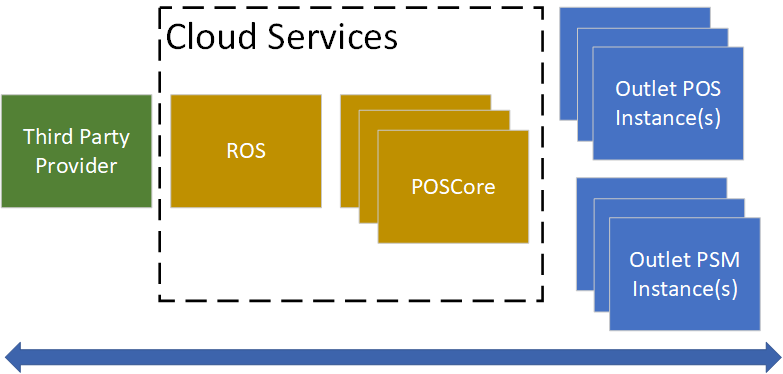
Remote orders sent to ROS will be distributed to the appropriate POS Outlets and all status notifications backcommunicated to the provider defined webhook.
Concepts
Menu
In order for a provider to send an order to a POS, they must first agree upon the set of a valid items that can be ordered. This is done by synchronising a Menu between an Outlet and the provider. Each item in that menu will have at a minimum a unique identifier and price, these will be synchronised ahead of time between the outlet and provider.
In the event that provider / outlet are out of synchronisation, the outlet will attempt to honour the information being sent by the provider as best as possible.
Orders
Remote Orders are designed to represent a single transaction with the outlet (via the provider). They are not designed to be incrementally altered over time. If using an Consumer "Eat-In" style workflow, send each batch of ordered items as seperate Remote Orders.
If the provider is taking payment on behalf of the outlet then they should be sure that the order is fully paid for before transmitting to ROS.
Notifications
When the ROS first recieves an order there will be a delay before the outlet actually sees the order. Normally this will be near instant but networking issues could see it being delayed some time. Providers can setup their ROS integration to notify them (via webhook) whenever an order is confirmed / rejected. It is recommended to do this as until an order is confirmed / rejected, you can't be sure that the outlet has even seen the order.