Adding a Remote Order
Add Endpoint
POST /remoteorders/add
Required Headers
Authorization: Bearer <token>
Body
Submit a single JSON encoded Remote Order as the POST body.
Returns
HTTP 200on successHTTP 400on malformed RemoteOrder (do not resubmit without fixes)HTTP 401on invalid/missing Authorization token (do not resubmit without updating Authorization)HTTP 403on a correct authorization token but for the wrong outlet (or the outlet has disabled the integration). Do not resubmit.HTTP 503on service is starting up or is not yet ready to process your request, please wait 30 seconds and retry.HTTP 5XXon an error internal to ROS. This would typically only occur due to an internal transient connection issue, please retry for a limited number of attempts after a short delay.
On success the response body will contain a single JSON encoded AddResponse containing the RemoteOrderID assigned to this order by ROS. If you plan on supporting order cancellation, you will need this ID.
Remarks
A response of 200 will indicate that ROS has validated the order and has successfully sent it to the appropriate POSCore (i.e. the remote order has been persisted). This does NOT indicate that the POS has processed the order, for that you will need to configure a processed orders webhook (See below) and have it registered in the outlet's provider configuration.
Authorization is done using your organisation scoped bearer token (see AccessToken for details).
Some considerations for the Remote Order model:
- The vast majority of properties are optional (and many only apply to certain flows)
OutletIDwill need to be retrieved in advance from the outlet (during PSM configuration).ProviderIDmust be set to match your provider ID. Setting this incorrectly will result in ROS rejecting the orderRemoteOrderIDwill be generated by ROS (overriding anything sent by the provider). To track this order in the future useProviderOrderID- Customer Details and GDPR - ROS / POS will only hold the personally identifying information for the duration of the order processing and delivery. After fulfilment it will be scrubbed.
ServiceModeEntityIDshould only be set for EatIn flows. Please set it using the service mode rules found in theMenuResponsereceived when the menu was last requested.
Processed Orders Webhook
The provider configuration in PSM can be optionally configured with a URI that ROS will post to when the POS has progressed an outgoing order to the processed state.
Whenever the POS marks a RemoteOrder as confirmed / rejected (and the Remote Order has ProviderExpectsProcessedNotification set to true), ROS will send notifications to the URI specified during Onboarding.
For more details please see Notifications Webhook
Validation
For debug/development purposes there is also a validation endpoint that can be used to validate an order's contents.
For more details please see Validate Orders
Processing Timeline
This section will attempt to explain the rough timeline of adding an order and how the various Webhook Notifications and Endpoints fit. It will make reference to the following architecture:
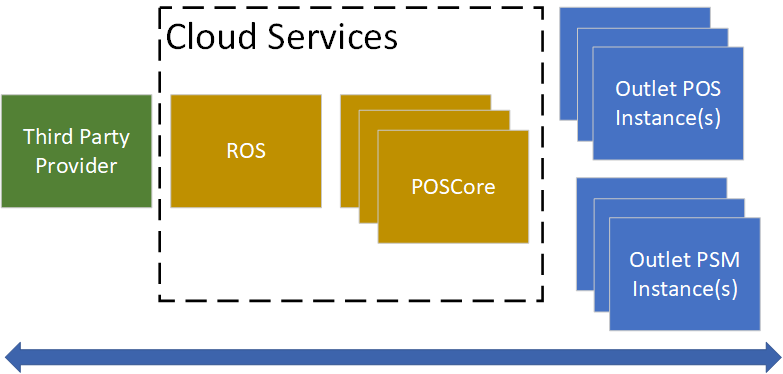
- ROS recieves an order at the add endpoint described above. It’ll be persisted at POSCore and a HTTP 200 with the referenced
remoteOrderIdwill be returned near instantly. - The Outlet POS instance will be made aware of the order (typically < 1 second) where it will download the order and attempt to process it.
- If the outlet is offline and the Remote Order
dateTimeExpiresAtUTCis reached then POSCore will instead reject the order and return a processed order webhook notification with the rejection type beingExpired.
- If the outlet is offline and the Remote Order
- During processing the onsite POS will reserve any stock and ensure that it can otherwise fulfill the order. When processing concludes a processed order webhook notification will be sent to your webhook.
- Under normal circumstances the processed order webhook should be received within a few seconds of adding the order.
- If the RemoteOrder
providerExpectsProcessedNotificationis false, this notification will be skipped - If the RemoteOrder
providerSupportsRejectionis false the POS will go to extra lengths to display whatever it can re: the order and any problems instead of rejecting the order (although rejections can still occur in certain circumstances). Using this flag can introduce reliability concerns, PowerEPOS does not recommend its use.
- The processed webhook notification will be received at the nominated webhook URI (whether confirmed/rejected).
- Every order with RemoteOrder
providerExpectsProcessedNotification: truewill generate a proceesed order notification. - This is the best and most reliable method for determining whether the onsite POS has received the order. PowerEPOS attempts to guarantee delivery of these notifications by retrying communications at all legs of the transmission for up to an hour.
- Every order with RemoteOrder
- If the provider wishes to cancel an order after it's been added, the Cancel Endpoint can be utilised.
- cancellations can be sent before receiving the processed webhook notification.
- If the RemoteOrder
providerExpectsOrderPreparedNotficationis true then the onsite POS will have the option of sending an order prepared webhook notification indicating that the order is ready for pickup- This is typically done by a staff member manually and as such, even when providerExpectsOrderPreparedNotification is true there’s no guarantee of it being sent.
- The primary use case is for instore ordering and pushing notifications to the consumers device when their food is ready for collection.